

Backlinks are a key factor in growing your website’s organic traffic, but their value lies in how well you track their impact.
To measure results effectively:
- Set clear achievable goals: Define measurable objectives like increasing organic traffic by 25% in 90 days or driving 15 conversions from referral traffic.
- Record starting metrics: Use tools like Google Analytics 4 (GA4) and Google Search Console (GSC) to document baseline data (e.g., organic sessions, impressions, clicks, and referring domains).
- Monitor backlink performance: Track traffic changes using GA4 and GSC reports, focusing on metrics like clicks, sessions, and conversions. Backlinku can help automate this process.
- Analyze results: Compare metrics before and after acquiring backlinks to identify patterns and determine which links drive the most traffic and conversions.
- Report ROI: Use metrics like domain authority, click-through rates, and organic conversions to evaluate backlink quality and demonstrate campaign success.
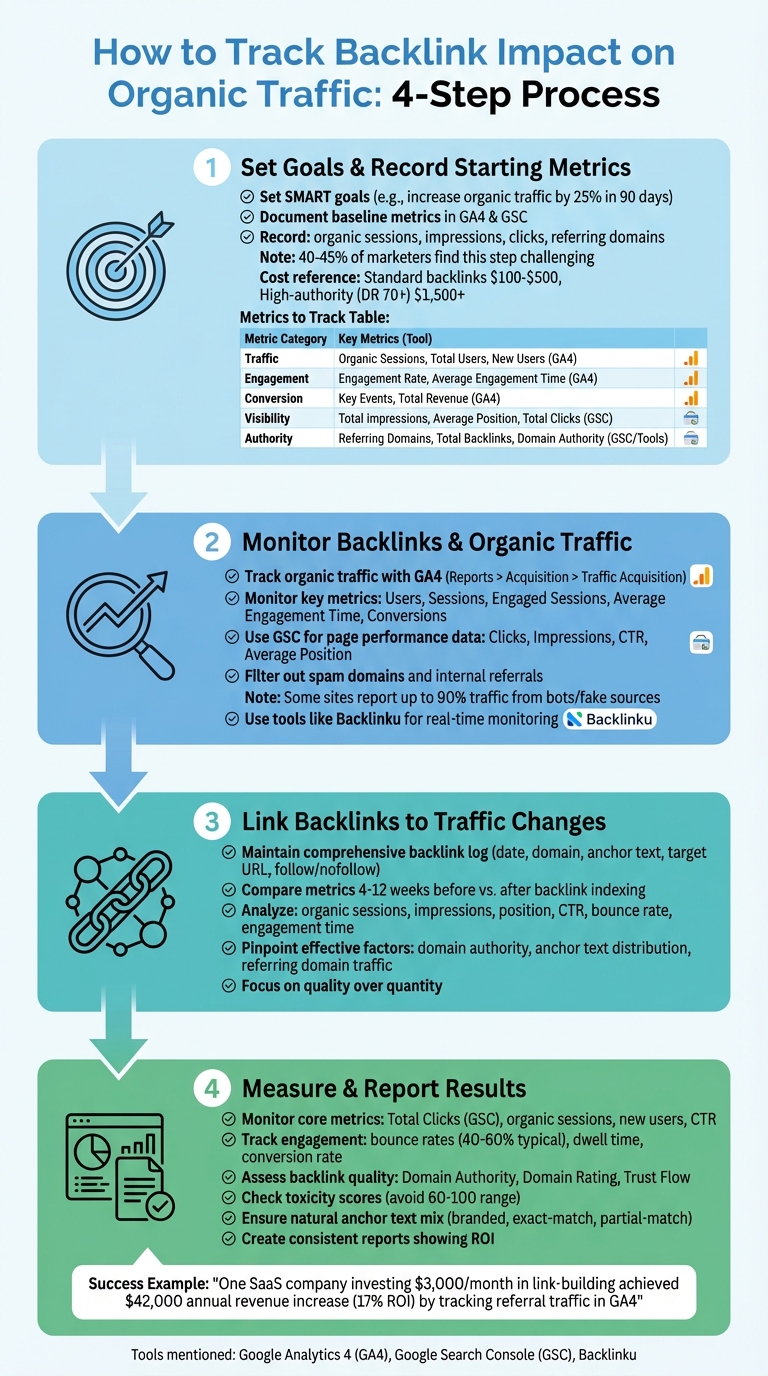
4-Step Process to Track Backlink Impact on Organic Traffic
Website Traffic Analysis Tutorial (Yours + Competitors)
Step 1: Set Goals and Record Starting Metrics
Before diving into a backlink campaign, it’s crucial to establish clear goals and document your starting metrics.
Surprisingly, around 40–45% of marketers find this step challenging.
Set Specific Goals for Your Backlink Campaigns
Generic goals like “increase traffic” aren’t enough to measure success effectively. Instead, focus on SMART goals that are specific and measurable.
For instance, you could aim to increase organic sessions by 25% within 90 days or secure 15% conversions from referral traffic in a single quarter.
Plus, your goals should also tie directly to business outcomes.
“For example, one SaaS company investing $3,000 per month in link-building reported a $42,000 annual revenue increase by tracking referral traffic in GA4, achieving a 17% ROI.”
This kind of success hinges on setting measurable targets right from the start.
Don’t forget to factor in the costs of acquiring backlinks.
Standard backlinks typically range between $100 and $500, while high-authority ones (DR 70+) can cost over $1,500.
Once your goals are in place, use GA4 and GSC to document your current performance metrics.
Record Starting Metrics with GA4 and GSC
To get an accurate baseline, head to GA4 and navigate to Reports > Acquisition > Traffic Acquisition. Filter by “Organic Search” and jot down metrics like organic sessions, total users, engagement rate, average engagement time, and key events (such as conversions). Over in GSC, take note of total impressions, clicks, average CTR, and average position.
You’ll also want to assess your current backlink profile. Use GSC or SEO tools to log the number of referring domains, total backlinks, and your domain authority score. This will give you an ideal benchmark for tracking changes in traffic, visibility, and authority.
Make sure your data is clean by filtering out spam domains and internal referrals in GA4 settings. Some websites report that up to 90% of their traffic comes from bots or fake sources, so eliminating this noise ensures your baseline is accurate.
Once you’ve got your baseline metrics, identify the specific pages and campaigns where backlinks will have the greatest impact.
Choose Which Pages and Campaigns to Track
Instead of monitoring your entire site, concentrate on a few high-value pages where backlinks can have the greatest impact.
Start with underperforming pages that show potential. Those with high impressions in GSC but a low CTR (below 3%). These pages are already visible but need a boost in authority to convert impressions into clicks.
Next, focus on your “money” pages, landing pages targeting primary keywords with high commercial or transactional intent. Don’t overlook evergreen content, either. These pieces cover timeless topics and tend to maintain steady search volumes over time.
To stay organized, create a simple spreadsheet to log the performance of each target page before your campaign kicks off. Include metrics like referring domains, domain authority, organic sessions, impressions, clicks, and average positions. This will make it easier to compare results after you start building backlinks.
| Metric Category | Tool | Specific Baseline Metrics to Record |
|---|---|---|
| Traffic | GA4 | Organic Sessions, Total Users, New Users |
| Engagement | GA4 | Engagement Rate, Average Engagement Time |
| Conversion | GA4 | Key Events (Conversions), Total Revenue |
| Visibility | GSC | Total Impressions, Average Position, Total Clicks |
| Authority | GSC/Tools | Referring Domains, Total Backlinks, Domain Authority |
Step 2: Monitor Backlinks and Organic Traffic
After setting up your baseline metrics, the next step is to analyze data from various sources. This will help you connect new backlinks to any changes in your organic traffic.
Track Organic Traffic with Google Analytics 4
Google Analytics 4 (GA4) is a powerful tool for understanding how visitors interact with your site. To get started, navigate to Reports > Acquisition > Traffic Acquisition, filter by “referral” traffic, and set the primary dimension to “Session source/medium.” This will show you which domains are driving traffic to your site.
Focus on these key metrics: Users, Sessions, Engaged Sessions, Average Engagement Time, and Conversions.
As Julio Febres, an SEO Specialist at Presenzia, explains:
“Backlinks that lead to conversions are of the greatest value to your website, and ideally, you should always strive to have backlinks that convert.”
GA4 also offers a Google Organic Search Traffic Report, which combines landing page data with Search Console metrics (like clicks and impressions) and Analytics metrics (like active users and engagement rates).
Keep in mind that Search Console data might take up to 48 hours to show up in GA4.
| Metric in GA4 Organic Report | What It Tracks |
|---|---|
| Organic Google search clicks | Clicks from Google Search results to your site |
| Organic Google search impressions | Times your site appeared in Google Search results |
| Engaged sessions | Sessions meeting engagement criteria (e.g., 10+ seconds, a key event) |
| Average engagement time | How long users actively interact with your site |
| Key events | Specific conversion actions triggered by users |
Make sure to filter out internal traffic, payment processors (like PayPal), and referral spam in your GA4 data stream settings. Cleaning your data ensures that your reports reflect actual user behavior without interference from bots or spam.
For a deeper dive into performance, pair GA4 insights with Google Search Console.
Use Google Search Console for Page Performance Data
While GA4 focuses on user behavior, Google Search Console (GSC) is your go-to tool for tracking how your site performs after a backlink campaign.
Alex Sandro, Senior Product Manager at Serpzilla, emphasizes:
“A link that receives clicks and brings real traffic is more valuable for search engine optimization.”
Start by visiting GSC’s Links report. Here, you can check the Top Linked Pages to get an overview of your link profile. Clicking on a URL will show you the top sites linking to that page.
Next, head to the Performance Report. Use the Pages tab to select the URL of interest, then compare metrics like Clicks, Impressions, Click-Through Rate (CTR), and Average Position before and after the backlink was indexed.
If you need a detailed analysis, you can export up to 100,000 rows of link data. Just remember, GSC retains data for a maximum of 16 months.
Additionally, keep an eye on the Top linking text report. This helps ensure that anchor texts remain relevant and natural, which is critical for maintaining SEO integrity.
Monitor Backlinks with Backlinku
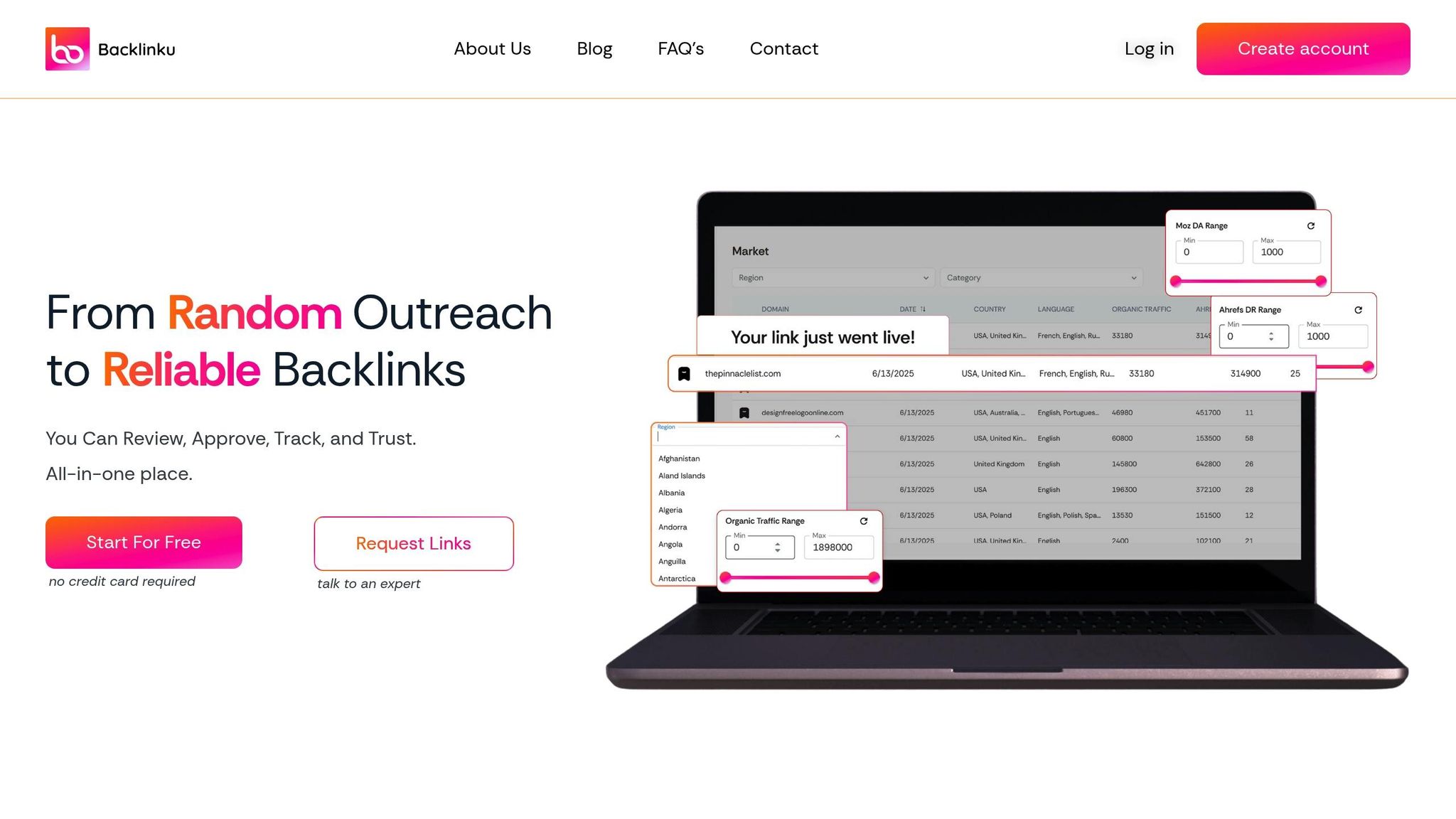
Once you’ve analyzed traffic and performance using GA4 and GSC, shift your focus to tracking individual backlinks in real time with Backlinku.
This tool allows you to group backlinks by project and compare their performance over time. Automated reports make it easy to see how new links impact traffic growth.
Dashboard consolidates all your backlink data and sends timely alerts for any changes, saving you the hassle of juggling multiple tools. This streamlined approach ensures you can efficiently track how backlinks influence your site’s performance.
sbb-itb-566d57e
Step 3: Link Backlinks to Traffic Changes
Once you’re monitoring GA4, GSC, and Backlinko data, the next step is connecting your backlinks to organic traffic changes. This involves documenting and comparing metrics, using the baseline data from Steps 1 and 2 to uncover actionable patterns.
Maintain a Comprehensive Backlink Log
A detailed log is essential for tracking how backlinks impact your site.
Record key details for each backlink, including the acquisition date, referring domain, anchor text, target URL, and whether it’s a follow or no-follow link.
Tools like Google Sheets, combined with GA4 add-ons like SyncWith, can automate this process. You can also use custom formulas with IMPORTXML to automatically pull title tags and no-follow status.
As Bengü Sarıca Dinçer, SEO Team Lead at Popupsmart, emphasizes:
“The quality, relevance, and status of your backlinks can change over time and failing to monitor them can hurt your SEO.”
Google Search Console (GSC) allows you to export detailed link data, enabling you to build a comprehensive backlink profile. Once your log is in place, you can move on to analyzing how these backlinks influence your metrics.
Compare Metrics Before and After Backlink Acquisition
To measure the impact of backlinks, compare key metrics such as organic sessions, new users, impressions, average position, click-through rate (CTR), bounce rate, and engagement time over two periods: 4–12 weeks before and after the backlink is indexed.
In GA4, use an “Organic Traffic” segment within the “Pages and Screens” report to focus on how search visitors interact with the page that gained the backlink.
Tracking engagement metrics helps confirm whether the traffic driven by the backlink is valuable. Once you’ve gathered this data, the next step is to determine which backlink factors are driving the most significant results.
Pinpoint Effective Backlink Factors
Dig deeper into the elements that make certain backlinks more impactful. Factors like domain authority, anchor text distribution, and the referring domain’s traffic all contribute to the ranking.
Brian Dean, Founder of Backlinko, highlights the importance of unique referring domains:
“Google puts less weight on a backlink from the same site… the next link they send my way will be significantly less powerful.”
Ahrefs can help by estimating the organic traffic of each linking page, allowing you to identify backlinks that are already performing well and likely to pass value.
Strive for a natural mix of anchor texts: branded, exact match, and partial match. Additionally, cross-reference GSC data with GA4 to identify which pages have the most backlinks and check if these pages show corresponding increases in organic sessions. This analysis lays the groundwork for step number 4.
Step 4: Measure and Report Backlink Results
To turn raw data into meaningful insights, it’s important to measure and document the impact of your backlinks.
Monitor Core Organic Traffic Metrics
Start by keeping an eye on Total Clicks in Google Search Console, as this is a key indicator of your SEO efforts – Brian Dean emphasizes that an increase in Total Clicks often reflects successful strategies.
Beyond that, use GA4 to track metrics like organic sessions and new users to gauge visitor volume. Check impressions to measure visibility and analyze your organic click-through rate (CTR) to ensure your listings are engaging users.
Engagement signals are equally important. For instance, bounce rates typically range from 40% to 60%, depending on the industry.
Dwell time can reveal whether visitors find your content useful after arriving via backlinks. For pages tied to specific business objectives, tracking the organic conversion rate will help you assess the ROI of your backlink campaigns. Once you’ve reviewed these metrics, it’s time to evaluate the quality of the backlinks themselves.
Assess Backlink Quality and Relevance
It’s not enough to look at numbers alone. To understand the true worth of your backlinks, you need to assess their quality and relevance.
Use metrics such as Domain Authority, Domain Rating, and Trust Flow to evaluate referring sites. Links from sites within your industry carry more weight than those from unrelated sites. Placement is also important; contextual links embedded in the main content are more valuable than links in footers or sidebars. Additionally, make sure links are dofollow and avoid those with high toxicity scores (60–100).
Don’t forget to review the anchor text. A natural mix of branded, exact-match, and partial-match anchor text helps avoid over-optimization penalties.
Create Consistent Reports with Backlinku
Backlinku simplifies the reporting process by organizing campaigns into categories like “Live”, “In Progress”, and “Action Required” within its centralized dashboard.
When creating reports, combine backlink performance metrics with organic traffic data to clearly show the campaign’s ROI.
Tailor your reports to your audience. Executives are likely to focus on metrics like revenue impact and ROI, while SEO teams might need more detailed insights, such as page-level traffic changes and the health of individual links.
Backlinku’s automated tracking and built-in reporting tools make it easier to shift your focus toward strategic growth.
Conclusion: How to Track Backlink Impact
Review of the Tracking Process
Tracking the impact of backlinks involves a structured approach: start by setting specific objectives and recording baseline data using tools like GA4 and GSC. Then, keep an eye on backlinks and traffic trends, connect new backlinks to any traffic changes, and report key metrics. Focus on core indicators like clicks, impressions, and conversions, while also evaluating backlink quality through authority and toxicity scores.
Prioritize quality over quantity by targeting high-authority domains. Ensure your anchor text profile stays natural by using a mix of branded, non-branded, exact match, and naked URL anchors.
To make this process easier, specialized tools are invaluable.
Next Steps for Better SEO Results
To maximize your backlink strategy, set up a weekly review process alongside a more detailed monthly analysis. Assign a dedicated team member to oversee SEO metrics, ensuring no details are overlooked.
Use the data you collect to refine your approach. Identify the types of content that attract the best backlinks, and create more of that content. Perform competitor link gap analyses to find websites linking to your competitors but not to you.
Set up automated alerts to track new backlinks, lost links, and brand mentions, allowing you to respond quickly. Regularly audit your backlink profile at least every six months to keep it clean and penalty-free.
FAQs
How can I find out which backlinks are driving the most conversions?
To figure out which backlinks are driving the most conversions, you can combine Backlinku’s link-tracking tools with Google Analytics 4 (GA4) data.
Start by enabling link tracking in Backlinku to keep tabs on clicks and performance for each backlink. Then, head over to GA4’s Traffic Acquisition report, filter for referral traffic, and add key conversion metrics like purchases or signups. Sorting by the number of conversions will show you which backlinks are making the biggest impact.
For a deeper dive, compare Backlinku’s performance data to ensure those backlinks are active and effective. Focus on scaling the links that are performing well and look for patterns like relevance or anchor text that you can replicate in future campaigns. This strategy allows you to zero in on backlinks that truly move the needle for your business.
What are the best tools to monitor backlink performance and their impact on organic traffic?
To understand how backlinks impact organic traffic, using a mix of analytics tools and SEO platforms is your best bet. Start with Google Analytics (GA4), which tracks referral traffic, bounce rates, and conversions from linking domains. This data gives you a clear picture of how backlinks are contributing to visits and engagement.
For a deeper dive, Backlinku offers built-in tools to track links in real time and monitor their performance. It’s particularly handy for identifying which backlinks are driving traffic and conversions. You can also pair GA4 with Google Sheets for a budget-friendly way to organize backlink data, such as follow/nofollow status and target pages.
If you’re after advanced insights, platforms like Ahrefs and Semrush deliver detailed metrics on backlink quality, referring domains, and overall link health. These tools help you directly connect your backlink strategy to organic traffic growth.
How often should I review my backlink profile to maintain strong organic traffic?
To make sure your backlink profile stays strong and supports your SEO goals, aim to review it every 3 months. These regular check-ins let you spot any low-quality or harmful links, keep track of new backlinks, and confirm that your link-building strategies are delivering the right results.
If your site is expanding quickly or you’re actively working on link-building campaigns, you might want to review your backlinks more often. Staying proactive helps you adapt to changes and keep your backlink profile in good shape.